- Home
- About Company
- Our Products
- Brochure
- Career
- Gallery
- Contact US
Online inkjet printer with Conveyor
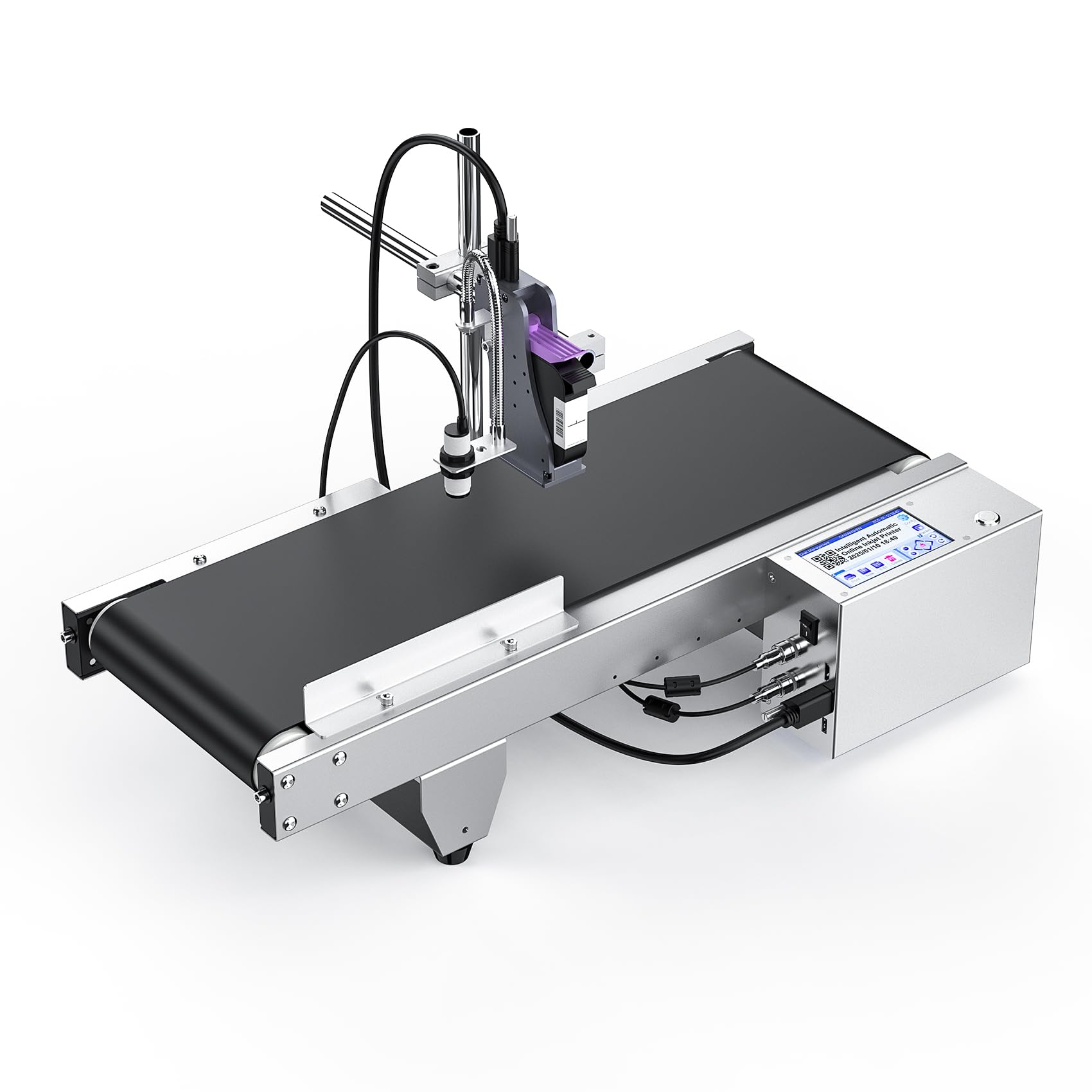
An online inkjet printer with a conveyor is an industrial machine that automatically prints variable information, such as batch codes, expiration dates, and barcodes, onto products as they move along a conveyor belt. This all-in-one system is designed for high-speed production lines and is used to efficiently apply clear, high-resolution text, logos, and other codes onto a variety of surfaces like cardboard, plastic, metal, and glass.
Key components and features
- Inkjet Printer: Uses thermal inkjet (TIJ) technology to produce sharp, high-resolution prints (often up to 600 DPI). It can be a compact unit mounted above or next to the conveyor.
- Conveyor Belt: A powered belt system that moves products smoothly under the printer for consistent and accurate print application.
- Printing Surface: Capable of printing on a wide range of materials including paper, cartons, plastic, metal, glass, and even some curved surfaces.
- Printing Contents: Can print essential information such as:
- Production and expiration dates
- Batch and lot codes
- Barcodes and QR codes
- Logos and serial numbers
- Adjustable Stand: Many systems include an adjustable stand to easily change the height and angle of the printer to accommodate different product sizes.
- User Interface: Often controlled via a simple screen, such as a 5-inch touch screen, and can be integrated with other software systems.
- Speed: Designed for high-volume applications, with many systems capable of high-speed operation (e.g., 60 pieces per minute or more).
- Technology: Relies on proven technologies like HP 45 inkjet cartridge technology and fast-drying solvent inks suitable for various surfaces.
How it works
- Loading: Products are placed on the conveyor belt, either manually or automatically, and are aligned to move smoothly under the printer.
- Sensing: A sensor detects the product's presence and position as it passes the print head.
- Printing: The inkjet print head sprays the required information (dates, codes, logos) onto the surface of the product as it travels along the belt.
- Output: The printed product continues along the conveyor to the next stage of the production process, such as packaging or sorting.